
RHEL/CentOS/OL 7 cheat sheet: firewalld and firewall-cmd
The firewalld daemon manages the firewall (with firewall-cmd, for example) and supports splitting the network into "zones" (sets of rules) so that each zone can be given a particular level of access. In RHEL/CentOS/OL 7, firewalld replaced system-config-firewall:
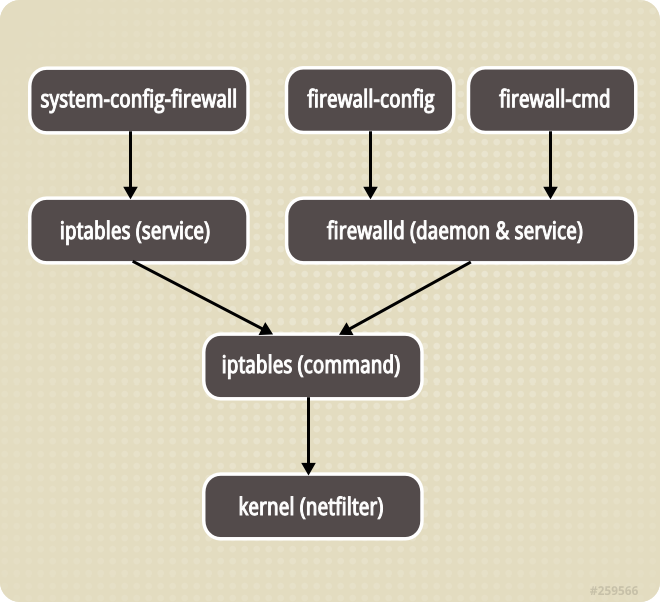
Zones:
- drop: the lowest level of trust; all incoming traffic is dropped without a reply, only outgoing connections are allowed
- block: like drop, but incoming requests are rejected with an icmp-host-prohibited or icmp6-adm-prohibited message
- public: a public network that cannot be trusted, though incoming connections are allowed case by case
- external: external networks with NAT masquerading allowed, so the internal network stays closed but reachable
- internal: the reverse of external: internal networks, where devices in the zone can be trusted
- dmz: for devices in the DMZ (with no access to the rest of the network); only some incoming connections are allowed
- work: a work network; most devices can be trusted
- home: a home network; the surroundings can be trusted, only user-defined incoming connections are allowed
- trusted: every device on the network can be trusted.
Check that firewalld is running:
firewall-cmd --state
running
If it isn't, start it:
sudo systemctl start firewalld.service
The default zone:
firewall-cmd --get-default-zone
public
The list of active zones:
firewall-cmd --get-active-zones
public
interfaces: ens160
Open TCP port 1521:
firewall-cmd --zone=public --add-port=1521/tcp --permanent
success
firewall-cmd --reload
Originally published in Russian on LiveJournal.