
How FreeMarker helps you build an HTML report from a template quickly (+ converting it to PDF)
Apache FreeMarker is a Java library (Apache 2.0 licence) that generates all kinds of text output (HTML, e-mails, configuration files, source code and so on) from templates and changing input data.
Templates are written in the FreeMarker Template Language (FTL), which is readable not only by a programmer but by, say, a front-end developer as well.
The data model can be, for example, a HashMap with Strings, Numbers and POJOs inside, or, with a little more effort, JSON.
The point is that the FreeMarker engine lets you use not only a set of standard functions and constructs (conditions, loops, number and string handling) but also extend a template with calls to your own functions (for example, spelling a number out in words, transliterating a string and so on). On top of that there is code completion in IDEA and Eclipse, which, if you use them, lets you develop "faster".
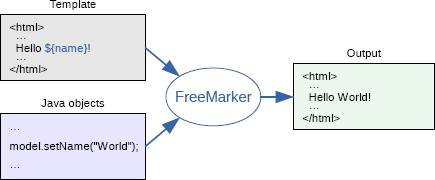
So, to generate a report you need to:
- Configure the engine:
// Set the configuration version
Configuration cfg = new Configuration(Configuration.VERSION_2_3_25);

// Where the template files live
cfg.setDirectoryForTemplateLoading(new File("/where/you/store/templates"));

// Template encoding
cfg.setDefaultEncoding("UTF-8");

// How errors are handled
// Use TemplateExceptionHandler.HTML_DEBUG_HANDLER.
cfg.setTemplateExceptionHandler(TemplateExceptionHandler.RETHROW_HANDLER);
- Create a data model:
(root)
  |
  +- user = "Big Joe"
  |
  +- latestProduct
      |
      +- url = "products/greenmouse.html"
      |
      +- name = "green mouse"
Like this:
// The root object is a HashMap, but it could be a JavaBean.
Map<String, Object> root = new HashMap<>();

// Put "user" into "root"
root.put("user", "Big Joe");

// Create "latestProduct"
Product latest = new Product();
latest.setUrl("products/greenmouse.html");
latest.setName("green mouse");
// and put "latestProduct" into "root"
root.put("latestProduct", latest);
The Java bean itself (the class must be public and have the corresponding getters):
public class Product {
    private String url;
    private String name;

    public String getUrl() {
        return url;
    }

    public void setUrl(String url) {
        this.url = url;
    }

    public String getName() {
        return name;
    }

    public void setName(String name) {
        this.name = name;
    }
}
- Get the template from the Configuration instance (the file test.ftlh must exist in /where/you/store/templates, which we set in the first step):
Template temp = cfg.getTemplate("test.ftlh");
The template file itself:
<html>
<head>
  <title>Welcome!</title>
</head>
<body>
  <h1>Welcome ${user}!</h1>
  <p>Our latest product:
  <a href="${latestProduct.url}">${latestProduct.name}</a>!
</body>
</html>
- Merge the template with the data and print it to stdout:
Writer out = new OutputStreamWriter(System.out);
temp.process(root, out);
- The result:
<html>
<head>
  <title>Welcome!</title>
</head>
<body>
  <h1>Welcome John Doe!</h1>
  <p>Our latest product:
  <a href="products/greenmouse.html">green mouse</a>!
</body>
</html>
Further reading:
- The list of built-in functions
- How to write your own function
- How to convert the resulting HTML, for example, to PDF with Flying Saucer:
import org.xhtmlrenderer.pdf.ITextFontResolver;
import org.xhtmlrenderer.pdf.ITextRenderer;

public static byte[] html2pdf(String html, String fontsPath) throws IOException,
                                                              DocumentException {
    ITextRenderer renderer = new ITextRenderer();
    loadFonts(renderer.getFontResolver(), fontsPath);
    renderer.setDocumentFromString(html);
    renderer.layout();

    ByteArrayOutputStream os = new ByteArrayOutputStream();
    renderer.createPDF(os);

    return os.toByteArray();
}
Originally published in Russian on LiveJournal.