
MIME4J: parsing e-mail without the pain
The Apache Software Foundation has a project called Apache James, in essence a mail server in Java, made up of a set of subprojects (Java libraries for working with e-mail).
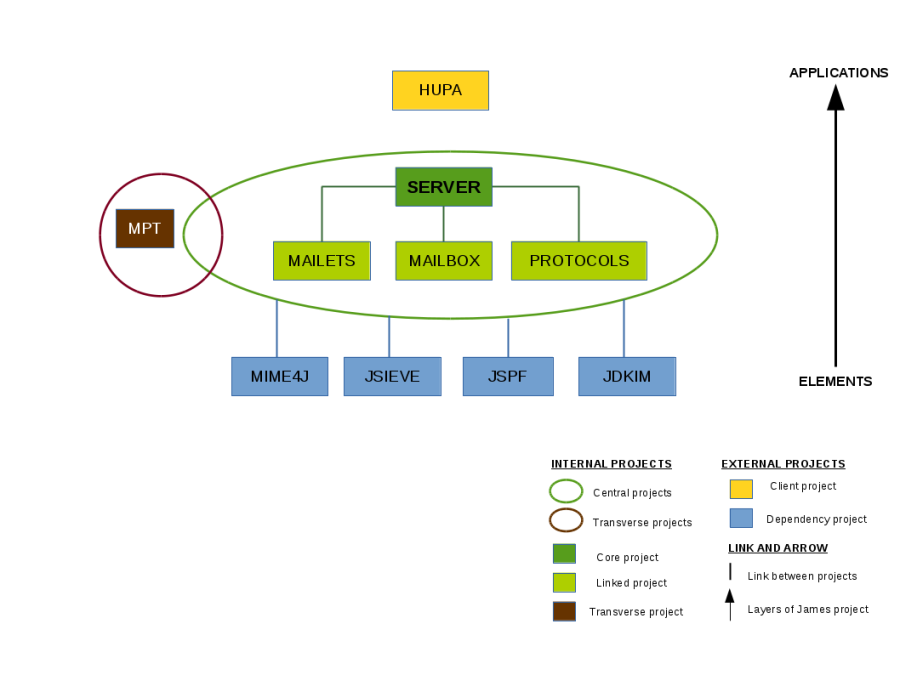
One of the libraries (subprojects) is MIME4J, for working with e-mail messages through event-based, DOM-style and other APIs.
Why not javax.mail, you ask?
Unfortunately, javax.mail is built around handling messages tightly coupled to a mail session. Whereas your task may be, say, to parse a message from a file or, the other way round, write one to a file, or to work with a stream or a buffer. Various PGP/GnuPG-based tools, for example, like to encrypt a complete multipart/mixed message as text, with every entity inline. And your task is to pull it all out and sort it. That is where Apache James comes to the rescue. All the examples below can be found here.
Well then, on to the code.
- Create a simple text/plain message:
// 1) start with an empty message
Message message = MessageBuilder.create()
// 2) set header fields
//    Date and From are required fields
//    Message-ID should be present
        .setFrom("John Doe <jdoe@machine.example>")
        .setTo("Mary Smith <mary@example.net>")
        .setSubject("Saying Hello")
        .setDate(new Date())
        .generateMessageId(InetAddress.getLocalHost().getCanonicalHostName())
        .setBody("This is a message just to say hello.\r\nSo, \"Hello\".",
                 Charsets.ISO_8859_1)
        .build();
try {
// 4) print message to standard output
    MessageWriter writer = new DefaultMessageWriter();
    writer.writeMessage(message, System.out);
} finally {
// 5) message is no longer needed and should be disposed of
    message.dispose();
}
- Create a complex multipart/mixed message:
// 1) start with an empty message
StorageBodyFactory bodyFactory = new StorageBodyFactory();
Message message = MessageBuilder.create()
// 2) set header fields
//    Date and From are required fields
//    Message-ID should be present
        .setFrom("John Doe <jdoe@machine.example>")
        .setTo("Mary Smith <mary@example.net>")
        .setSubject("An image for you")
        .setDate(new Date())
        .generateMessageId(InetAddress.getLocalHost().getCanonicalHostName())
// 3) set a multipart body
        .setBody(MultipartBuilder.create("mixed")
                .use(bodyFactory)
                        // a multipart may have a preamble
                .setPreamble("This is a multi-part message in MIME format.")
                        // first part is text/plain
                .addBodyPart(BodyPartBuilder.create()
                        .use(bodyFactory)
                        .setBody("Why so serious?", Charsets.UTF_8)
                        .setContentTransferEncoding("quoted-printable")
                        .build())
                        // second part is image/png (image is created on the fly)
                .addBodyPart(BodyPartBuilder.create()
                        .use(bodyFactory)
                        .setBody(createImageBody(bodyFactory,
                                                 renderSampleImage()))
                        .setContentType("image/png")
                        .setContentTransferEncoding("base64")
                                // Specify a filename in the
                                // Content-Disposition header
                                // (implicitly sets the disposition
                                // type to "attachment")
                        .setContentDisposition("attachment", "smiley.png")
                        .build())
                .build())
// setBody also sets the Content-Type header field
        .build();
try {
// 4) print message to standard output
    MessageWriter writer = new DefaultMessageWriter();
    writer.writeMessage(message, System.out);
} finally {
// 5) message is no longer needed and should be disposed of
    message.dispose();
}
- Create a message template and use it to build a message from the template (code for a mailing?):
// Explicitly set a strategy for storing body parts. Usually not
// necessary; for most applications the default setting is appropriate.
StorageProvider storageProvider = new TempFileStorageProvider();
StorageBodyFactory bodyFactory = new StorageBodyFactory(storageProvider,
                                                        DecodeMonitor.SILENT);

// Create a template message. It would be possible to load a message
// from an input stream but for this example a message object is created
// from scratch for demonstration purposes.
Message template = MessageBuilder.create()
        .setBody(MultipartBuilder.create("mixed")
                .addBodyPart(BodyPartBuilder.create()
                        .use(bodyFactory)
                        .setBody("This is the first part of the template..",
                                 Charsets.UTF_8)
                        .setContentTransferEncoding("quoted-printable")
                        .build())
                .addBodyPart(BodyPartBuilder.create()
                        .use(bodyFactory)
                        .setBody(createRandomBinary(200),
                                 "application/octet-stream")
                        .setContentTransferEncoding("base64")
                        .build())
                .addBodyPart(BodyPartBuilder.create()
                        .use(bodyFactory)
                        .setBody(createRandomBinary(300),
                                 "application/octet-stream")
                        .setContentTransferEncoding("base64")
                        .build())
                .build())
        .setSubject("Template message")
        .build();

// Create a new message by transforming the template.
// Create a copy of the template. The copy can be modified without
// affecting the original.
final MessageBuilder messageBuilder = MessageBuilder.createCopy(template);
// In this example we know we have a multipart message. Use
// Message#isMultipart() if uncertain.
Multipart multipart = (Multipart) messageBuilder.getBody();

// Insert a new text/plain body part after every body part of the
// template.
final int count = multipart.getCount();
for (int i = 0; i < count; i++) {
    String text = "Text inserted after part " + (i + 1);
    BodyPart bodyPart = BodyPartBuilder.create()
            .use(bodyFactory)
            .setBody(text, Charsets.UTF_8)
            .setContentTransferEncoding("quoted-printable")
            .build();
    multipart.addBodyPart(bodyPart, 2 * i + 1);
}

// For no particular reason remove the second binary body part (now
// at index four).
Entity removed = multipart.removeBodyPart(4);

// The removed body part no longer has a parent entity it belongs to so
// it should be disposed of.
removed.dispose();

// Set some headers on the transformed message
messageBuilder.generateMessageId(HOSTNAME);
messageBuilder.setSubject("Transformed message");
messageBuilder.setDate(new Date());
messageBuilder.setFrom("John Doe <jdoe@machine.example>");

Message transformed = messageBuilder.build();

MessageWriter writer = new DefaultMessageWriter();

// Print transformed message.
System.out.println("\n\nTransformed message:\n--------------------\n");
writer.writeMessage(transformed, System.out);

// Messages should be disposed of when they are no longer needed.
// Disposing of a message also disposes of all child elements (e.g. body
// parts) of the message.
transformed.dispose();

// Print original message to illustrate that it was not affected by the
// transformation.
System.out.println("\n\nOriginal template:\n------------------\n");
writer.writeMessage(template, System.out);

// Original message is no longer needed.
template.dispose();

// At this point all temporary files have been deleted because all
// messages and body parts have been disposed of properly.
- Parse a message with attachments and print information about the parts it is made of to stdout:
public static void printAllPartsFromFile(String fileName)
    throws IOException, MimeException {
  List<Entity> allPartsFromFile = getAllPartsFromStream(
                                    new FileInputStream(fileName)
                                  );
  int i=1;
  for (Entity e : allPartsFromFile) {
    System.out.printf("%d. FileName=%s\n", i++, e.getFilename());
    System.out.printf("   Charset=%s\n", e.getCharset());
    System.out.printf("   ContentTransferEncoding=%s\n",
                      e.getContentTransferEncoding());
    System.out.printf("   MimeType=%s\n", e.getMimeType());
    System.out.printf("   DispositionType=%s\n", e.getDispositionType());
    System.out.printf("   Header=%s\n\n", e.getHeader());
    if("text/plain".equals(e.getMimeType())) {
      IOUtils.copy(((TextBody)e.getBody()).getReader(), System.out);
    }
  }
}

public static List<Entity> getAllPartsFromStream(InputStream stream)
    throws IOException, MimeException {

  MessageBuilder builder = new DefaultMessageBuilder();
  org.apache.james.mime4j.dom.Message message = builder.parseMessage(stream);
  return getAllParts(message);

}

public static List<Entity> getAllParts(Entity entity) {
  List<Entity> ret = new ArrayList<>();
  if (entity.isMultipart()) {
    List<Entity> bodyParts = ((Multipart) entity.getBody()).getBodyParts();
    for (Entity bodyPart : bodyParts) {
      ret.add(bodyPart);
      if(bodyPart.isMultipart()) {
        ret.addAll(getAllParts(bodyPart));
      }
    }
  } else {
    ret.add(entity);
  }
  return ret;
}
I haven't covered the event-based parsing API, but it is there:
MimeTokenStream stream = new MimeTokenStream();
stream.parse(new FileInputStream("mime.msg"));
for (EntityState state = stream.getState();
     state != EntityState.T_END_OF_STREAM;
     state = stream.next()) {
  switch (state) {
    case T_BODY:
      System.out.println("Body detected, contents = "
        + stream.getInputStream() + ", header data = "
        + stream.getBodyDescriptor());
      break;
    case T_FIELD:
      System.out.println("Header field detected: "
        + stream.getField());
      break;
    case T_START_MULTIPART:
      System.out.println("Multipart message detexted,"
        + " header data = "
        + stream.getBodyDescriptor());
    ...
  }
}
My conclusion: for working with mail and messages in Java, use MIME4J.
Originally published in Russian on LiveJournal.